Having read some reports on the high download speeds available on 4G, I was keen to do some of my own testing.
I got hold of one a couple of weeks back, and since have had a chance to try connection speeds in Brisbane, Sydney and Canberra.
So is it all it’s cracked up to be? Well in a word – Yes. And more.
I have regularly had download and upload speeds in excess of 20Mb/s in each (Metro) location. So far the best was Brisbane, which clocked well over 30Mb/s for both download and upload.
So what does this mean?
Well if you are away from your cosy home or office ADSL connection, you can still achieve fast data speeds for emails, file downloads, and importantly – Skype!
Mobile 3G speeds (despite what you may hear) are more commonly in the 1 to 3Mb/s range, topping out (rarely) at 4 to 5Mb/s, and at times may be as low as 0.5Mb/s.
I’ve tested 3G speeds in Sydney, Canberra, Brisbane, Melbourne, Adelaide, Perth and Hobart. So we are talking about speeds (at least in CBD areas I’ve tested so far) of 5 to 10 times faster than 3G.
Let’s talk the basics first of all
3G mobile WiFi versus 4G (LTE)
I’ve been using a Telstra 3G mobile WiFi for some time, which has been very good. It’s battery-powered, and can recharge from laptop or wall charger – and lasts for many hours. From this unit you can connect up to 5 devices, particularly useful if you also travel with an Apple TV (for when you want to stream movies/music or other content from your iPhone/iPad etc to a plasma – for work or play).
The new Telstra 4G (LTE) is a little different.
Firstly it must be plugged into your laptop/computer to operate. So it is ‘mobile’ but not ‘sit-in-your-pocket’ mobile.
Secondly it doesn’t provide mobile WiFi connections like my 3G one does (but see below for how to get around this).
Thirdly – it’s much, much faster in Metro areas. It will even give some ADSL connections small speed syndrome.
Setting it up
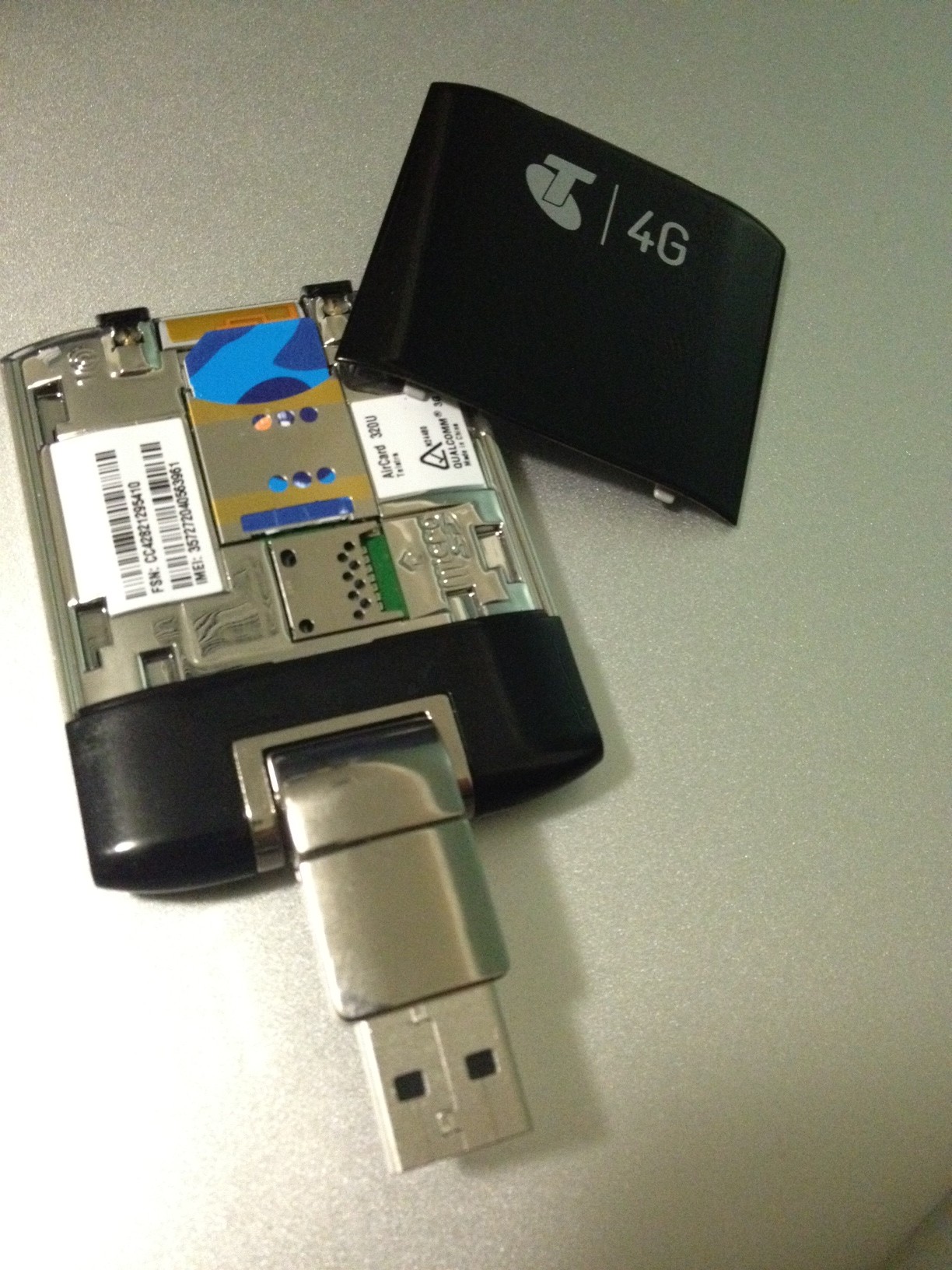
The unit itself uses the standard size sim. Note that it’s not the sim card that’s special, but the unit itself. Since it is fast though, you might want to review your download allowances in your mobile plan, else you might use it up before you know it!
If you don’t read the manual (and who really does read them), then you need to squint very hard to see which way the sim card goes in.
Here’s a pic to make it easier, the blunt corner of the sim is to the top left.
Once it’s plugged in, I found it a very simple process to get up and running.
It’s a lot more painful to get Telstra to get your account set up than to get this unit working. It’s lucky for Telstra that no-one comes close in broadband coverage and speed.
Once it’s working, then it’s plug and play thereafter. Just choose ‘connect automatically’ in the program settings (which present themselves to you once you plug the ‘dongle’ in), and that’s all that’s needed.
I find it connects within 15 or so seconds of being plugged in, without lifting a further finger.
Mine is plugged into a Mac Air, which allows me to share the connection and create your own wireless (WiFi) network, as noted above, this is useful when using an Apple TV and internet speed matters – if you are using YouTube for example.

What I’m really keen for is the release of future devices that use 4G. If the iPad3 comes out without 4G, I will be very disappointed. Same goes for the iPhone 5.
For these devices, particularly the iPad, the online experience, email downloads and even many applications that connect to the internet, will be greatly improved with 4G.
So for me, 4G gets 4 stars. If it worked unplugged, it would be an easy 5!
Post Script ..
Melbourne CBD test today (5/12/2011) 3G ~ 8Mb/s download, 1.5Mb/s upload and 4G ~ 29Mb/s download, 15Mb/s upload.
 Does size matter?



 Marc Fabris